"One or more features must be turned on before this feature can be activated"
Here i try to enable 'Office SharePoint Server Publishing' feature on a site collection thru
Site Settings > Site Administration > Site features
On clicking 'Activate' button I get the message
'One or more features must be turned on before this feature can be activated: Office SharePoint Server Publishing Infrastructure'
Solution
-----------
Here same problem was with Mark..he mention great explanation'Office SharePoint Server Publishing Infrastructure' site feature will not appear unless you are explicitly set as a Site Collection Administrator. and it worked for me. Great :)
The Imagine Cup: 2008 World Finals in Paris
Bill Gates
Chairman, Microsoft Corp
Click image for details.

Microsoft SharePoint Sales To Hit $1 Billion In 2008
Microsoft sold 75 million through the end of 2005 and 25 million more in the last two years -- meaning the suite has enjoyed a compound growth rate in license sales of about 15% over the past two years. Click here to get more.....
Error: Cannot get the list schema column property from the SharePoint list
“Cannot get the List Schema Column Property from the SharePoint list”

I fix that problem by changing the date column from my SharePoint List.
What you have to do is…simply remove your previous date column and add it again.
Do not delete your existed column. Copy your old column data in new column with different name. Then remove old column. Now it will work happily and your datasheet will export happily.
GEAR Up for Microsoft Office SharePoint Server!

Click on Image to go there.......
InfoPath Error Log ID:5566


Free MOSS 2007 Training Available @ Microsoft Site - Download Now
Training topics included
Collaboration
Finding your way around a team site Understanding permissions Customizing a team site Linking calendars to Outlook Adding Web Parts Collaborating in libraries, lists, and workspaces Using blogs and wikis to share information
Enterprise Content Management
Document management Protecting files Using workflows Records management Creating and publishing Web pages Improving compliance and support litigation discovery
Search
Finding files, Web sites, information, and people
Portals and personalization
My Sites Targeting content to specific audiences Managing access to your My Site
Business processes and forms
Streamlining business processes with forms and workflow Gathering information with browser-compatible forms Designing custom workflows using SharePoint Designer
Business intelligence
Sharing Excel workbooks as interactive reports Working with a Report Center site Using dashboards to drive decisions
So, why are you waiting .....click here to download from Microsoft's official site
Happy Learining :)
MOSS 2007 DRP - Disaster Recovery Plan
But here i am doing it step by step using MOSS Central Administration
So, Let's start...
1- Go to Central Administration -> Operations under backup and restore click perform backup
 2- Select Farm’s checkbox to backup & click Continue to Backup Options
3- By selecting it you will select complete backup

4- Select type of backup Full or Differential
5- Mention the path to where to store backup file
 6- File will be stored at given path with path with as folder name [spbr003] and spbtroc.xml file
Where 003 is auto number

Note: Please do not delete sptroc.xml file. It makes log of your MOSS 2007 backups. As xml file is showing list of your MOSS 2007 backups.

Following error will be displayed during backup restoration if it will not found sptroc.xml file.

Restoring MOSS 2007 Backup
Pre-requisites
a. Run dotnetfxv2.exe to Install Microsoft .NetFramework 2.0 on target machine
b. Click to given below document for IIS Installation
1- Go to Central Administration -> Operations under backup and restore click Restore from backup

2- Select desired file you want to restore backup and click Continue Restore Process
3- Select the contents you want to restore (here we select the whole farm to restore)

4- selecting Same Configuration your previous configuration will be restored e.g
Database Server Name = Previous Database Server name
5- Content Database Name= Previous Content Database name
Here we will select New Configuration
6- Put new Database Server name= Your Database Server Machine Name
 Change the New Web Application URL (Otherwise previous name will be selected automatically), New Web Application Name and New Database Server Name. Rest of settings will be loaded automatically
e.g New directory name.
 7- Go to Central Administration -> Operations under backup and restore click Backup and restore job status
 8- Given below screen will show you MOSS 2007 backup in progress
 Here you can see failure message for shared search index because it will not get the search configuration
Now for TestPortal you must login using your local administrator’s account. E.g
http://testportal/
Or
http://your_machine_name/
Corporate Presentation in ABCPort.com

Personalization in MOSS 2007 Search Results / Customization Using Office SharePoint Designer 2007
They were needed employee information with image in this way
-----------------------------------------------------------
Name: Tariq Younas
Ext:1122, Email: tariq.younas@gmail.com
Department: CTS, P&L: Intech, Office: Lahore
Designation: Software Engineer
-----------------------------------------------------------
Then i do some customization of People Search in MOSS 2007 Using Microsoft Office SharePoint designer 2007.
Microsoft Office SharePoint designer is great tool to customization.
Following given below is Step by Step Search Customization
Let's start........
1- Click to edit search page
 2- Click on Edit XSL Editor and paste the following xml code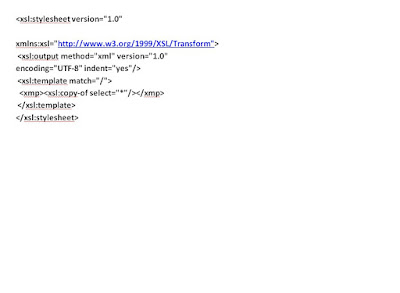
3- Replace the existing XSL markup from the Search Core Results Web Part with the following snippet
4- It will give you raw XML output during search

5- Now if you publish the page, you will see a result like the result in the following picture, which illustrates how the raw XML could look: copy it

6- Take a blank text file and paste it with xml extension now it will look like this

7- Open SharePoint designer and click on new aspx page

8- From SharePoint designer menu items click on Data View & insert Data view

9- Now click to add temp.xml and add your xml in SharePoint designer
10- After importing click on xml then there will option to show data

11- On right side pane you will see data
12- Just drag and drop you data fields as per your requirements

13- Click on the split window on aspx page. A XSL code will appear infront of you
14- copy code between two tags

15- Edit your search page and paste this code in XSL editor and apply

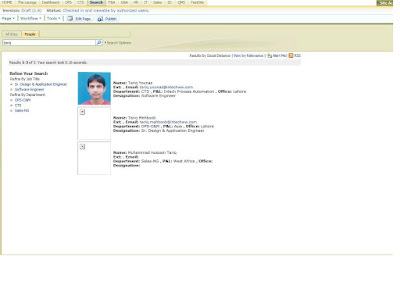
16- Ssearch like employee name
As I search tariq younas
Now results will be like this
 Happy Search Customization
Index Server Error in MOSS 2007 Configuration
New Shared Services Provide
Central Administration> Application Management > Manage this Farm' Shared Services> New Shared Services Provider
If you got Error in Index Server
No Indexer see given below image.


Then Go to Central Administartion > Operations

Central Administration> Operations > Services on Server
Sstart Search Index service as per given below image.

Microsoft sky drive

On every passing day Microsoft is going to introduce new thinngs.
Microsoft sky drive
Wherever you are ..... your personal data is live with you all time.
Features
Share files with friends
Store files for yourself
Share files with the world
http://skydrive.live.com/