Project Web Access is a companion product to Project that supports collaborative planning among team members, project managers, and other stakeholders. It lets people view, update, and analyze project information through a Web browser. Project Web Access helps team members communicate with project managers about the tasks they are performing and provides a place where everyone, including senior managers, can go to get project information.
ONE PARAGRAPH THAT EXPLAINS LIFE!
Arthur Ashe, the legendary Wimbledon player was dying
of AIDS which he got due to infected blood he received
during a heart surgery in 1983. From
world over, he received letters from his fans, one of
which conveyed: "Why does GOD have to select you for
such a bad disease"?
To this Arthur Ashe replied: The world over -- 5 crore
children start playing tennis, 50 lakh learn to play
tennis, 5 lakh learn professional tennis, 50,000 come
to the circuit, 5000 reach the grand slam, 50 reach
Wimbledon, 4 to semi final, 2 to the finals, When I
was holding a cup I never asked GOD "Why me?". And
today in pain I should not be asking GOD "Why me?"
Happiness keeps u Sweet, Trials keep u Strong, Sorrow
keeps u Human, Failure Keeps u Humble, Success keeps u
Glowing, But only God Keeps u "GOING".
of AIDS which he got due to infected blood he received
during a heart surgery in 1983. From
world over, he received letters from his fans, one of
which conveyed: "Why does GOD have to select you for
such a bad disease"?
To this Arthur Ashe replied: The world over -- 5 crore
children start playing tennis, 50 lakh learn to play
tennis, 5 lakh learn professional tennis, 50,000 come
to the circuit, 5000 reach the grand slam, 50 reach
Wimbledon, 4 to semi final, 2 to the finals, When I
was holding a cup I never asked GOD "Why me?". And
today in pain I should not be asking GOD "Why me?"
Happiness keeps u Sweet, Trials keep u Strong, Sorrow
keeps u Human, Failure Keeps u Humble, Success keeps u
Glowing, But only God Keeps u "GOING".
Download Visual Studio 2008
Get download Microsoft Visual Studio 2008 from Microsoft official site.
http://msdn2.microsoft.com/en-us/vstudio/products/aa700831.aspx

http://msdn2.microsoft.com/en-us/vstudio/products/aa700831.aspx

How can I improve productivity in my organization using an Intranet or Employee Portal?
An intranet or employee portal, allows users to to get all information they need at a glance: the portal builds the pages from small independent pieces of information - the so called modules. A Portal Pages can therefore include modules from various sources i.e. Human Resources such as latest HR policies. Updating and pushing this content is easy and is available immediately to all of your employees.


Site Collection in MOSS 2007
Here is simple University example of Site Collection in SharePoint.

Cheers.

Cheers.
What Makes Microsoft Business Solutions Unique?
Microsoft Business Solutions bring together information from every corner of your company and let you analyze it to make more profitable decisions.


Shared Services Provider (SSP) in MOSS 2007
On completion Microsoft Office SharePoint Server 2007 installation, you must configure the primary Shared Services Provider (SSP).
Your SharePoint sites will rely on to provide services such as search, personalization, or business intelligence.
For configuration of Shared Services Provider (SSP) Click Here
Difference between Full & Incremental Import in MOSS 2007 Administrative Services

While configuring Porfile and Properties in Administrative Services of Share Point Server 2007 there is an option on screen Import Schedule (Full) screen Import Schedule (Incremental)
What's difference between Full & Incremental here?
- To perform a full import regularly so that users who have been deleted from data source can be removed from the user profile database.
- To perform incremental mean to specify when and how often to import information about users whose records have changed since the last update.
Hunt your Microsoft SharePoint Jobs @ Rozee Fair – 2008: Location: Lahore – Islamabad -Karachi


Its time to hunt your Microsoft .Net / SharePoint Technology job at Rozee Fair 2008. Rozee.pk is going to conduct
ROZEE.PK Job Fair 2008
30th March - Karachi
For More info. Plz Click Here
Microsoft Real Time Industry Solutions
Microsoft research, different industry problems and their solutions can help you to guess which Microsoft product will help in your business.
Simply logon to http://www.microsoft.com/casestudies
Here you can view a complete list of Microsoft products case studies by specifying product, organization and Country.
How to redirect or resolve your IP address?
Using sharePoint Portal if you need that your hosted portal must be access by another name like
http:\\YourName
instead of http:\\machinename\portalName


Following are steps to do this.
1- Go to run and write c:\WINDOWS\system32\drivers\etc and press enter

Folder will open with following files as given below in image.

2- Open the file by name of hosts in notepad editor

3-Write below next line of localhost you computerIP and your desired name as per following given below image.
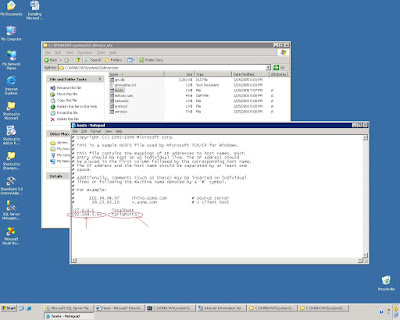

4- Save file and close it.
5- Now restart your IIS

6- Now write in the browser as i am writing
tariqPortal.com as per given below image

7- Give your administrator password or password which have administrative rights

Finally your Portal will be infront of you.

Cheers.
Application page VS Safe page in SharePoint
•Application page
Application page is an a template page from _layouts virtual directory with following characteristics: –it is available within every site –only one copy of this page on the server –It is not accessible through Designer when editing a site –It is accessible through IIS
•Safe page
Safe page is a template page that comes from site definitions (For example: default.aspx in "Team Site" template). –it exists only on sites where it's been specified by a template or created by a user –many copies can exist on the server –It is accessible through Designer when editing a site –It is not accessible through IIS