Pulling a single entity in Storage Table

Following the piece of code uses TableOperation to specify the customer 'Tariq Younas'. This method returns just one entity rather than a collection, and the returned value in TableResult.A result is a CustomerEntity object.


Azure Infrastructure Services at ICA

Today i had a session on Azure Infrastructure Services with the focus (VNet, Storage &Traffic Manger) held at International College of Auckland.
Students were keen to learn about Microsoft Azure IaaS concepts and demo. The main focus of the session was to show them demo how to take the real benefit of Azure IaaS services in practical scenarios. They came to know about Azure resources and certifications as well.


Mind-blowing (Azure Cloud Shell) on Azure Portal

The mind-blowing new feature of Azure Portal Azure Cloud Shell provides browser-based shell experience has been announced by Microsoft in Microsoft Build 2017.
A long awaiting feature finally pushed at Azure Portal. Thank you, Microsoft. It’s really very good attractions for developers also. PowerShell support coming soon as highlighted in the last image.


2. Click on highlighted “>_” as shown below


3. Here is another prompt to select the Subscription (Production, Test etc). In my case it is Pay-As-You-Go


4. After you select there you can see the Command Line :)


At the moment its supporting only Bash. PowerShell coming soon:)


ARM Templates deployment Using CLI 2.0


Following are steps to use CLI 2.0

1. Goto command prompt


2. Type for Login


3. Copy and past the following link in Internet Explorer and put the code shown below


4. Set the subscription for example : Production/Preprod or Test etc.

5. First validate the template

6. Start deployment of deployment of template


above # 5 and 6 commands are almost same other than create --name SPdeployment which is deployment name.


az login

az account set -s preprod

az group deployment validate --resource-group rg-ae-sharepoint --template-file sp-template.json --parameters @sp-parameters-preprod.json

az group deployment create --name SPdeployment --resource-group rg-ae-sharepoint --template-file sp-template.json --parameters @sp-parameters-preprod.json                          
                     

@Microsoft NZ for Training

Today I am bit sick but in the same time some couple of days at Microsoft for training advance Azure Infrastructure Services. The trainer is really technical entertained our bombardment of questions in a nice way. Thank you Microsoft.


Grow With Microsoft Cloud

Thanks to Cornell Institute of Business & Technology - New Zealand who gave me the opportunity to talk about Microsoft Cloud – Azure.
The target audience of the session were final term students who are a couple of months away to land in ICT industry. They discussed their final projects how they can complete their projects using Azure machine learning.


Microsoft Cloud focused Meetup Launched

Today I am pleased to announce meetup group "Auckland Cloud Computing" with the focus on Microsoft Public/Private Cloud technologies.

Come and join sessions about Microsoft Azure/ Azure Stack (Hybrid Computing) and related tools/technologies. The group conducting monthly meetups in order to share learning sessions about Introductions, Upcoming features/ Changes in Microsoft Private and public Cloud products.

Group focus on
  • Microsoft Cloud News/Updates
  • Azure [IaaS, PaaS]
  • Hybrid Computing (Microsoft Azure Stack)
  • Hands-On Trainings 
Everyone is welcome. Looking forward to meeting you!

https://www.meetup.com/Auckland-Cloud-Computing-Meetup/


SharePoint Monitoring Using Azure Application Insights

Application Insights is the great way to dig down/ troubleshooting issues with any application hosted local or on the cloud. It's quite easy to configure. There are 3 ways to configure 
  • Build Time
  • Run Time
  • Both of above
Following type of reports diagnostics, we can collect using Application Insights
  • Diagnostic trace logs 
  • Dependency rates
  • Response times
  • Failure rates
  • AJAX Calls, Exceptions
  • Host diagnostics 
  • Page views and load performance
  • User and session counts
  • Performance counters
  • Custom events and metrics

Let me show you step by step example how to configure Azure Application Insights to monitor Sharepoint Site


1. In PowerShell use below command in order to connect with Azure

Login-AzureRmAccoun


2. Click + button and search for "Application Insights"


3. Click "Create" button


4. Provide credentials, i gave name "Test_ApplicationInsights"


5. Service only available in following regions until now may be later Microsoft will offer in other regions


6. Here you can see the properties of "Application Insights"


7. Click "Getting Started" in order to pull script (This is the script you will insert in your SharePoint site pages)


8. After copying script past in SharePoint Site using SharePoint ribbon to insert script as shown below


9. After inserting users, session and page views will be visible in Azure Portal (Application Insights)


10. There you go, you can see the graphs/stats from different angles


Microsoft Azure CLI 2.0 GA

Another exciting news from Azure Team announcement GA of VM, ACS, storage and network command in Azure CLI 2.0. Now users will be able to use commands on Production environment with complete support by Microsoft through Azure support channels as well as through GitHub.

Overview

Samples

Installation

GitHub


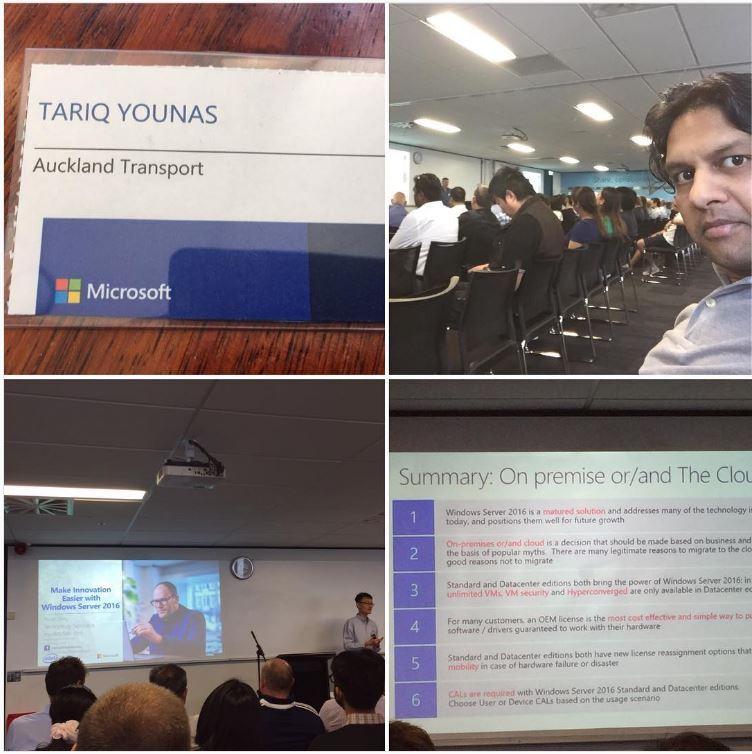
Next Generation Hybrid Solutions - On Premise or in The Cloud

Windows Server 2016 cloud-inspired technologies are intended to help your business reach its full potential. Operate with agility while maintaining security, resilience, and performance. Safeguard your business with enhanced security, improve the efficiency and productivity of your organisation and create a plan to utilize the cloud effectively and easily. All of this, with Windows Server 2016.

Had great training session from Noel Teng (Microsoft Malaysia)about how to maximize revenue opportunity for the next generation of Hybrid Technology. He talked about licensing also and that was really new thing for me. It was at Cliftons Level 4, 45 Queen Street, Auckland.


Grab your favorite tweets in mailbox using - Azure Logic App

Microsoft introduces the new world of simple integration called Logic Apps. One of the most powerful features offered in Azure in order to integrate complex stuff in an easy way. Visual designer to model and automate your process as a series of steps known as a workflow.

Out-of-the-box connectors reduce integration challenges in Microsoft Azure. Connect applications, data, and devices anywhere in the world doesn’t matter they are on-premises or in the cloud. Connectors range includes Salesforce, Office 365, Twitter, Dropbox, Google Services and much more.


Below article is having steps (Grab your favourite tweets from twitter in your mailbox) with images

1. Login with your credentials on https://portal.azure.com 


2. Search for Logic App


3. Give a Name, Select Subscription, Resource Group and location. In my case since i am New Zealand so close for us is Australia.


4. After you press ok, Logic App will be in deployment process


5. You can see heaps of options but I will select only "When New Tweet is Posted" because we need to catch all favourite tweets


6. Here it required "Sign In" your account


7. Popup will show appear for credentials input


8. Since I need to see all Azure Stack tweets so, my input below is #AzureStack


9. Search for email, you will get no of options including gmail as well, I am selecting outlook.com


10. After you select Email Option will give you prompt about authorization to your email account


11. Fill the fields with your requirements


12. After you give an email submit and you can see the success message as shown below


13. Now from my Twitter account I did tweet with hash tag #AzureStack


14. Next minute email prompted in my mail box :)


15. Here you go, you can see i received the latest tweet :)


Microsoft Azure Cloud Seices ++

Microsoft is increasing Azure Cloud Service speedily. Here I compile services offered by Microsoft which are increasing continuously


Compute
Databases
Service Fabric
Linux Virtual Machines
Virtual Machine Scale Sets
Batch
App Service
Azure Container Service
Cloud Services
Windows Virtual Machines
Azure Container Registry
Functions
SQL Database
DocumentDB
Data Factory
SQL Data Warehouse
Redis Cache
SQL Server Stretch Database
Security + Identity
Networking
Azure Active Directory B2C
Security Centre
Key Vault
Azure Active Directory Domain Services
Multi-Factor Authentication
Azure Active Directory
Security Information
VPN Gateway
Virtual Network
Traffic Manager
Azure DNS
Load Balancer
ExpressRoute
CDN
Application Gateway
Intelligence + Analytics
Developer Tools
Data Factory
Cognitive Services
HDInsight
Data Lake Store
Data Lake Analytics
Analysis Services
Azure Bot Service
Machine Learning
Power BI Embedded
Data Catalog
Stream Analytics
API Management
Visual Studio Team Services
Azure DevTest Labs
HockeyApp
Application Insights
Storage
Internet of Things
StorSimple
Backup
Storage
Site Recovery
Data Lake Store
Machine Learning
IoT Developer Center
Azure IoT Suite
Stream Analytics
Azure IoT Hub
Event Hubs
Notification Hubs
Monitoring + Management
Web + Mobile
Scheduler
Application Insights
Automation
Site Recovery
Log Analytics
Backup
Azure Monitor
Billing
Azure Resource Manager 
Azure Advisor
App Service
API Apps
Web Apps
Mobile Apps
Logic Apps
Media Services
Notification Hubs
CDN
Search
Mobile Engagement
Enterprise Integration